Disclosure: Save Image As Type is ours, and this blog is published by the same people. Anything said here about our own software is written by an interested party. The last section names our own extension as one of the routes that never upload an image. It is one option there beside the browser's own encoder and a desktop app, and it is not the one listed first. We sell a converter, so a page arguing against uploading yours has a motive worth reading sceptically - every claim below links to its source.
The short answer, and the part it hides
For a screenshot of a meme, a reaction GIF, a wallpaper you found on someone’s blog: an online converter is fine. Drag it in, get a JPG back, close the tab. Nothing about that image was yours to lose.
For a photo of your passport, a scan of a signed contract, a picture of your child, a screenshot with an account number in it: the honest answer is different, and it has two parts.
The first is true of every online converter, including the good ones. Your file leaves your device. It travels to a server you do not run, gets decoded and re-encoded there, and sits on that server’s disk for as long as that company’s policy says it does. HTTPS protected it on the way; it did nothing once the file arrived.
The second is true of a smaller set of them, and it is worse. Some converter sites do the conversion perfectly and hand back a file with malware in it, or mine the file you uploaded for anything sellable. That is not a hypothetical - it is the specific thing the FBI put out a public warning about.
What “upload to convert” actually does
A converter website cannot run on the page you are looking at. It needs your file’s bytes on its own machine to work on them. So “drag your image here” means, in order:
- Your browser sends the whole file to the site’s server over HTTPS.
- The server decodes it, re-encodes it in the target format, and writes both the original and the result to disk.
- It sends the result back and, at some later point, deletes what it stored.
Step 3 is a promise. You cannot see it happen, you cannot verify it happened, and which company made the promise is often not clear from the page you are on. The entire trust question lives in that gap.
Compare that to the two-format menu your operating system already has. Save image as… in the browser writes the exact bytes the site sent you, with no re-encoding and no format change - which is why it cannot turn a WebP into a JPG. The conversion has to happen somewhere. The only question is whose computer.

The reputable end still moves your file off your machine
Take CloudConvert, which is one of the better-run services in this category and publishes a security page rather than a slogan. Read on its own terms, that page says the file is uploaded to cloud infrastructure - it names AWS - in a region you select, that transfers are SSL encrypted, and that files are “kept only for processing and deleted immediately afterwards”, with no permanent storage offered.[4]
That is about as good as the model gets, and it still means: your image was on Amazon’s servers, in a data centre in some jurisdiction, handled by a company whose retention policy you are taking on faith and can change without telling you. For a meme, none of that matters. For a document, you have just made a copy of it somewhere you will never be able to point at.
None of this makes CloudConvert or its peers dishonest. It makes them a service you are trusting, and the reason to notice that is the next section: the sites that abuse the trust look identical from your side of the screen.
The malicious end: the FBI warning, and why the file still converts
In March 2025 the FBI’s Denver field office issued a public warning about free online file and document converter tools. These tools are not broken. The conversion works - you get the PDF, the MP3, the merged file you asked for - and the same download can carry hidden malware that gives an attacker remote access to the machine, an outcome the FBI ties to incidents including ransomware.[1] The uploaded file itself is also mined, for names, social security numbers, banking details, cryptocurrency seed phrases and wallet addresses, email addresses and passwords.[1]
Because the output is correct, nothing looks wrong. You converted a file, you got
a file, you moved on. Security researchers who followed the campaign tied it to
the Gootloader malware loader
and to Windows executables dressed up as converter tools on domains such as
docu-flex[.]com and pdfixers[.]com - sites that did deliver a real conversion
next to the payload.[2]
Image converters are a quieter corner of this than document and MP3 tools, which is where most of the documented cases sit. But the shape is the same: a free tool, no account, no company name, reached from a search result, that wants your file uploaded. The category is worth this much caution because you cannot inspect the server, and the operator’s incentives are invisible.
Why you cannot tell the two apart from the browser
Every converter site is the same page. A box that says drag your file here, a format dropdown, a convert button, maybe an ad. The reputable service and the site the FBI is describing render identically, load from the same kind of URL, and show up in the same search results and sponsored ad slots. There is no badge, no address bar cue, no padlock difference - the malicious one has HTTPS too.
This is the same problem that took down the extension this site exists to
replace. The original “Save Image As Type”, with over a million users, was
pulled from the Chrome Web Store in March 2026
after its inject.js was found quietly contacting a server and swapping its own
affiliate codes into 578 identifiable sites - taking a commission on purchases
its users never knew were being redirected.[5] It kept converting
images the whole time. From the outside it looked like exactly what it had always
been.
Google has since tightened the rule that behaviour broke: an extension may add an affiliate link only when the program is disclosed on the listing, in the interface and before installation, a user action precedes each link, and the link carries a benefit for the user at that moment - and “continuously injects affiliate links in the background without related user action” is now a listed violation, enforced since 10 June 2025.[3] That rule is for extensions. A random converter website is under no such policy at all.
The questions that actually sort them
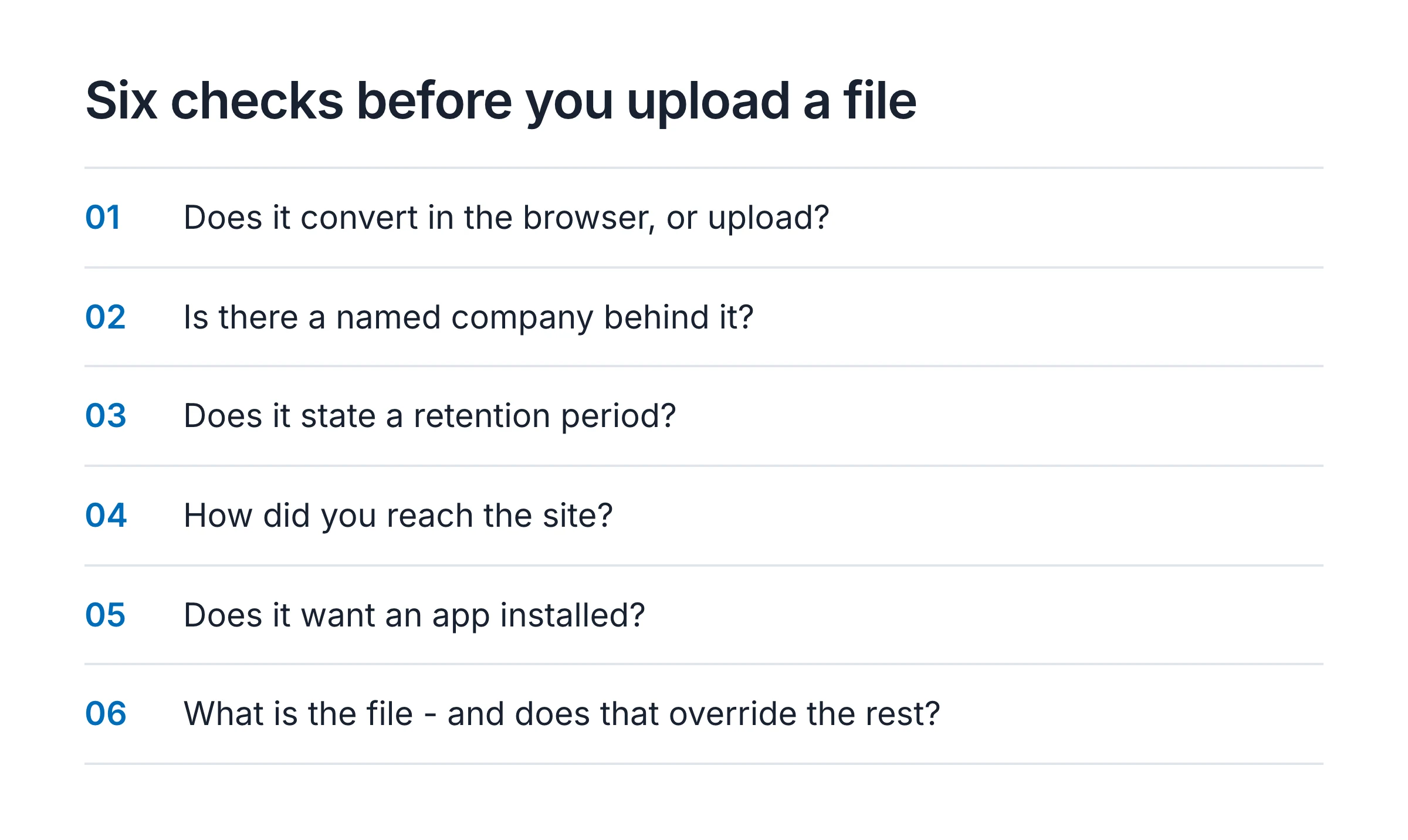
You cannot audit the server. You can ask questions the answers to which are checkable, and a site that fails several of them is one to close.
| Question | A good sign | A bad sign |
|---|---|---|
| Does it convert in your browser, or upload? | The page says “in your browser” / “no upload” and works with your connection off | The file uploads before anything happens |
| Is there a company behind it? | A named company, a business address, a real privacy page | No name, no contact, ownership unclear |
| Does it state a retention period? | A specific claim - deleted after processing, or within N hours | Nothing, or “we value your privacy” with no number |
| How did you get here? | Typed the address, or a link you already trusted | A sponsored ad, or the top of a search you just ran |
| Does it want an app installed? | It is a web page and stays one | It offers a desktop “converter” download |
| What is the file? | A meme, a wallpaper, nothing personal | A document, a face, an account number, a key |
The last row overrides the rest. A file with nothing at stake can go through almost anything. A file with something at stake should not go to a server you cannot name, and arguably should not go to one you can.
The routes that never upload anything
If the file matters, the reliable move is to not put it on anyone’s server. Three ways, roughly in order of how little you have to install.
Your browser can already do it. A browser canvas encodes image/jpeg,
image/png and image/webp - that is in Chromium’s source,
in the list MIMETypeRegistry uses.[6] Open the image in a new tab,
and any “save as JPG” that runs in the page is using that encoder, on your
machine, offline. The WebP problem, end to end walks
through the browser-native routes for the common case of a WebP that will not
open.
A desktop image tool. Preview on macOS, Paint or Photos on Windows, an editor like GIMP anywhere - open, export to the format you need. Nothing leaves the machine, and for a folder of files a desktop tool converts in bulk in one pass. Bulk converting images without uploading compares the tools that do it.
A browser extension that converts locally. This is the “save as…” menu item the browser is missing. The ones worth using do the encode in the browser through that same canvas API and upload nothing - which also means the extension itself never has your image on a server, and neither does anyone else. Save Image As Type is one of these; its conversion runs in the browser and no image data or URL is sent anywhere, which is disclosed in its privacy policy. Best image converter extensions for Chrome, Firefox and Edge compares it against three others, including one whose source code you can read and ours cannot - the honest version of that comparison, since the last section established why “trust me” is not an answer.
One caveat on the extension route, because it is the one this site is selling: a store listing that declares a data category is not proof that data leaves your device. Google’s User Data FAQ requires the disclosure “even when data is processed or stored locally”, so a declared category means the developer followed the rule, not that anything was uploaded.[7] Read the privacy policy, not the category chip.
So: are they safe?
| What you are converting | Online converter | What to use instead |
|---|---|---|
| A meme, a GIF, a wallpaper, anything public | Fine | - |
| A personal photo with a face in it | Not worth it | Browser, desktop tool, or a local extension |
| A document, a form, a contract, an ID | No | A route that never uploads |
| Anything with a password, key or account number visible | No | A route that never uploads, and crop the number out |
| A whole folder of files | Slow and repetitive anyway | A desktop tool, in one pass |
Online image converters are not a scam category. Most of them do exactly what they say. But “most” is the operative word, you cannot tell the exceptions apart from your side of the screen, and even the honest ones are a copy of your file on a stranger’s disk. When the file is nothing, none of that matters. When it is something, the conversion your browser can already do for free is also the one that never leaves.
If you came here on the way to converting a WebP, the end-to-end guide to the WebP problem covers every route including this one; for the specific formats, WebP to JPG and WebP to PNG are the walkthroughs.
Sources
- FBI Denver: warning on the online file converter scamPrimary source
That in March 2025 the FBI's Denver field office warned that free online file and document converter tools can perform the advertised conversion while the resulting file also carries hidden malware that can give an attacker remote access, and that such tools can scrape the uploaded file for names, social security numbers, banking information, cryptocurrency seed phrases, wallet addresses, email addresses and passwords, leading to incidents including ransomware.
- BleepingComputer: FBI warnings are true - fake file converters do push malwarePeer-reviewed
That security researchers tied the campaign to the Gootloader malware loader and to Windows executables disguised as converters on domains including docu-flex[.]com and pdfixers[.]com, and that the sites did deliver a working conversion alongside the payload. Read .
- Chrome Web Store: Affiliate Ads policyPrimary source
That the Chrome Web Store allows an extension to add an affiliate link only when the affiliate program is disclosed on the listing, in the UI and before installation, a related user action precedes each link, and the link carries a direct benefit for the user at that moment, and that continuously injecting affiliate links in the background without user action is a listed violation, enforced from 10 June 2025. Read .
- CloudConvert: security overviewPrimary source
That a well-run online converter, by its own description, uploads the file to cloud infrastructure in a chosen region, encrypts transfers with SSL, keeps files only for processing and deletes them immediately afterwards, and provides no permanent storage. Read .
- 9to5Google: Chrome extension with 1M+ users removed as malwareReporting
That the original Save Image As Type, with at least a million users, was removed from the Chrome Web Store in March 2026 after its inject.js was found contacting a server and swapping in its own affiliate codes across 578 identifiable sites. Read .
- Chromium source: MIMETypeRegistry::IsSupportedImageMIMETypeForEncoding()Primary source
That a browser canvas can encode image/jpeg, image/png and image/webp, which is what lets the browser itself, or an extension, write a real JPG or PNG with no server involved. Read .
- Chrome Web Store: User Data FAQPrimary source
That a developer must disclose data handling even when data is processed or stored locally on the user's device, so a declared data category on a listing is not by itself evidence that data leaves the machine.